
Your blog post gets read. Then a few readers click through to a product page, a pricing table or a signup form. Great. Now open your analytics and try to say which post sent them. Without tagged links you mostly cannot.
UTM parameters fix that. They are short tags added to the end of a link that tell your analytics tool where a click came from.
How do you track blog traffic to product pages with UTM parameters?
Tag every link that points from a post to a product page. Here is the setup in six moves.
1. Start with the three tags you always need
Google Analytics Help says to always use utm_source, utm_medium and utm_campaign. Leave one out and it shows up as (not set) in your reports. For blog links I use these values:
- utm_source is blog. It names where the click lived.
- utm_medium is content. Some people use referral. Pick one and never switch.
- utm_campaign is the post slug, such as how-to-price-a-service. This is the tag that answers which post.
2. Add content for placement and skip term
Two buttons in one post can point at the same pricing page. Which one earns the click? Google Analytics Help describes utm_content as the tag for telling creatives apart, with two calls to action in one email as its example. A blog works the same way. Tag the intro button intro-cta and the end banner end-banner.
Google describes utm_term as the tag for paid keywords. Organic blog links have none. Leave it off unless you pay to promote the post.
Put together, a link looks like this:
yourstore.com/pricing?utm_source=blog&utm_medium=content&utm_campaign=how-to-price-a-service&utm_content=intro-cta
3. Keep every value lowercase
Values are case sensitive. Google Analytics Help treats Facebook and facebook as separate sources, and Spring_Sale and SpringSale as distinct campaigns. Google recommends lowercase. Use hyphens between words and write the rule down. I once found three spellings of newsletter in one report.
4. Build the links instead of typing them
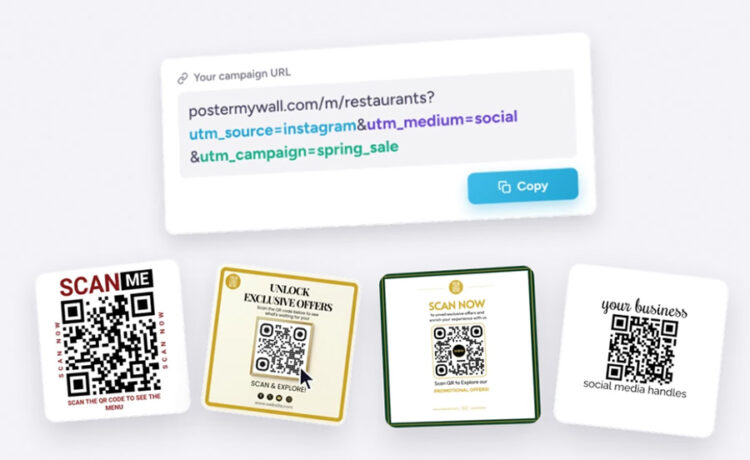
Hand typing is where typos start. I build mine in the PosterMyWall UTM builder. Paste the page URL. Add a source, a medium and a campaign name. Fill in term or content if you want them. Copy the finished link. It joins the tags for you so you never hand-type a ? or an &. It is free.
The same tool works when you promote the post itself. Tag the link in your newsletter or social posts with its own source. Printing a flyer? Paste the tracked link into the free QR Code Generator and print the code.
5. Read the results in GA4
Go to Reports > Acquisition > Traffic acquisition. The default dimension is Session default channel group. Switch the primary dimension to Session source / medium or Session campaign. Look for blog / content and read down the campaign names. Each slug is a post.
6. Keep UTMs off internal links
Here is the pitfall. UTMs belong on links coming from outside your site. On an internal link they can overwrite the original traffic source. A reader who arrived from search could get credited to your blog instead.
If the blog lives on a separate domain, tag its links freely. If it sits on the same domain as the site (a /blog folder for example) use UTMs only on links that promote the post from outside. Track blog to site clicks with GA4 landing page and page path reports or click events. Google Analytics Help also notes that UTM values do not show in the Landing page + query string dimension. Another reason not to rely on them for internal paths.
Frequently Asked Questions (FAQs)
1. Do I need UTMs if my blog and store share a domain?
Only for links that bring people to the post from outside. For clicks between your own pages use landing page and page path reports or click events in GA4.
2. What happens if I forget a tag?
Google Analytics Help says missing source, medium or campaign values show up as (not set) in reports. Those visits cannot be tied to a post.
3. Can PosterMyWall help me track a post I share by email or on a flyer?
Yes. The PosterMyWall UTM builder is free and gives you a tracked link to copy for your newsletter or social posts. For print you can drop that same link into the free QR code generator and download the code.
Tag Outside Links Only
Start with one post. Build its link in the UTM builder and tag the intro button and the end banner. Check Traffic acquisition after a week. Then repeat for the rest of your posts and see which ones really send readers to your product pages.